Converting Medical Reports from RTF to HTML using C#
Creating a C# class to handle the clean conversion of RTF clinical reports to HTML. Handling the whitelisting of valid HTML tags & removing unwanted empty paragraphs
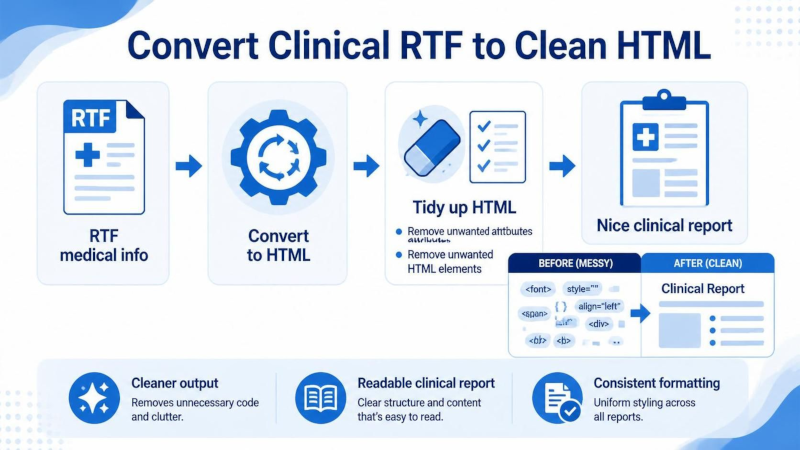
Table of Contents
Introduction
I’m developing a downtime solution which will allow healthcare facilities to continue giving patient care when the main hospital ERP/EHR is unavailable, either due to planned or unplanned downtime.
To ensure the application runs as intended, I need to normalise all medical data & reports to a standard HTML format.
Many clinical systems still output care plans & power chart forms as text formatted as RTF (Rich Text Format). In this article, we’ll write a C# class that handles the clean conversion of RTF to HTML.
Getting started
Before starting, you’ll need to install the following NUGET packages, as we’ll leverage their capabilities in our solution.
1dotnet add package HtmlAgilityPack --version 1.12.4
2dotnet add package HtmlSanitizer --version 9.1.949-beta
3dotnet add package RtfPipe --version 2.0.7677.4303
Creating the class and validating the RTF
Within your project, add a new class file called Bradley.Software.RTF.Processing.cs and create the stub of the class as shown below:
 1using HtmlAgilityPack;
 2using HtmlSanitizer = Ganss.Xss.HtmlSanitizer;
 3using RtfPipe;
 4using System.Text;
 5
 6namespace Bradley.Software.RTF.Processing;
 7
 8public class Bradley_RFT_to_HTML_Processor
 9{
10    private readonly HtmlDocument _doc;
11
12    public Bradley_RFT_to_HTML_Processor(string html)
13    {
14        if (string.IsNullOrWhiteSpace(html))
15            throw new ArgumentException(
16                "HTML cannot be null or empty", nameof(html));
17        _doc = new HtmlDocument();
18        _doc.LoadHtml(html);
19    }
20
21    public override string ToString() => _doc.DocumentNode.OuterHtml;
22}
Next, we need to add a function that ingests the raw RTF content and converts it to HTML.
We need to register the legacy encodings for ANSI code pages, as many RTF files use this encoding to represent extended character sets. Registering this legacy encoding provider allows RTF Pipe to parse the RTF content correctly.
 1    public static Bradley_RFT_to_HTML_Processor RTF_Raw_String(string rtfData)
 2    {
 3        if (string.IsNullOrWhiteSpace(rtfData))
 4            throw new ArgumentException(
 5                "RTF data cannot be null or empty", nameof(rtfData));
 6
 7        // RTF content commonly uses ANSI code pages (here cp1252);
 8        // register legacy encodings and normalise incoming text
 9        // through cp1252 so extended characters parse correctly.
10        Encoding.RegisterProvider(CodePagesEncodingProvider.Instance);
11        rtfData = Encoding.GetEncoding(1252).GetString(
12            Encoding.Default.GetBytes(rtfData));
13
14        var html = Rtf.ToHtml(rtfData);
15
16#if DEBUG
17        Console.WriteLine("Converted HTML:\n" + html);
18#endif
19        return new Bradley_RFT_to_HTML_Processor(html);
20    }
After the check making sure the data passed is not null or empty, and before the code page encoding,
there are a couple of additional checks we can perform on the data before calling the Rtf.ToHtml function.
First we can check the magic bytes for data stream to ensure to starts with {\rtf1\
 1    if (string.IsNullOrWhiteSpace(rtfData))
 2        throw new ArgumentException(
 3            "RTF data cannot be null or empty", nameof(rtfData));
 4
 5    ...
 6
 7    // Verify RTF magic bytes: RTF files should start with {\rtf1\
 8    var trimmedRtf = rtfData.TrimStart();
 9    if (!Regex.IsMatch(trimmedRtf, @"^{\\rtf1\\", RegexOptions.IgnoreCase))
10        throw new ArgumentException
11            ("RTF data does not contain valid RTF magic bytes", nameof(rtfData));
Secondly we can add a check to ensure that the structural braces are balanced.
That is, equal numbers of lef and right braces.
If the brace count doesn’t match then the RTF data stream is malformed.
Bear in mind when doing this validation we need to exclude literal { }’s in the text.
This is achieved by excluding from the count braces which are escaped with the \ character.
1    // Verify structural braces are balanced
2    // (ignore escaped literal braces: \{ and \})
3    var openBraceCount = CountStructuralBraces(rtfData, '{');
4    var closeBraceCount = CountStructuralBraces(rtfData, '}');
5    if (openBraceCount != closeBraceCount)
6        throw new ArgumentException(
7            $@"RTF data has unbalanced braces: {openBraceCount} opening,
8                {closeBraceCount} closing", nameof(rtfData));
The function which counts the structural braces is shown below.
 1private static int CountStructuralBraces(string rtfData, char brace)
 2{
 3    var count = 0;
 4    for (var i = 0; i < rtfData.Length; i++)
 5    {
 6        if (rtfData[i] != brace)
 7            continue;
 8        // A brace is literal text when preceded
 9        // by an odd number of backslashes.
10        var backslashCount = 0;
11        for (var j = i - 1; j >= 0 && rtfData[j] == '\\'; j--)
12            backslashCount++;
13        if (backslashCount % 2 == 0)
14            count++;
15    }
16    return count;
17}
We also discard any text to the right of the last } character. RTF uses the curly braces to enclose formatting commands.
The start of an RTF document looks something like {\rtf1\fbidis\ansi ... so the last } should be the closing bracket for the whole document. Any text after the last } can’t therefore be part of the document and can be rejected for this purpose.
1    // Discard everything to the right of the last }
2    var lastClosingBraceIndex = rtfData.LastIndexOf('}');
3    if (lastClosingBraceIndex >= 0)
4        rtfData = rtfData.Substring(0, lastClosingBraceIndex + 1);
Sanitizing the HTML
The HTML that the conversion creates is very verbose with lots of style attributes which make it difficult to style the medical reports with a central style sheet.
1<div style="font-size:12pt;font-family:Aptos, sans-serif;">
2<table style="line-height:1.4;border-spacing:0;font-size:inherit;box-sizing:border-box;margin:0 0 0 0.3px;">
3  <colgroup><col style="width:100.5px;"> ....
To clean up the HTML after the conversion, then we use the HtmlSanitizer to clear all the allowed attributes, include style, so that the HTML tags are much cleaner. We also whitelist which HTML tags we’re happy to include in the final HTML; everything else is dropped.
 1public Oracle_RFT_to_HTML_Processor Sanitize()
 2{
 3    var sanitizer = new HtmlSanitizer
 4    {
 5        KeepChildNodes = true
 6    };
 7    sanitizer.AllowedAttributes.Clear();
 8    sanitizer.AllowedTags.Clear();
 9    sanitizer.AllowedTags.Add("p");
10    sanitizer.AllowedTags.Add("table");
11    sanitizer.AllowedTags.Add("tr");
12    sanitizer.AllowedTags.Add("td");
13    sanitizer.AllowedTags.Add("th");
14    sanitizer.AllowedTags.Add("b");      // bold
15    sanitizer.AllowedTags.Add("strong"); // alternative for bold (b)
16    sanitizer.AllowedTags.Add("i");      // italic
17    sanitizer.AllowedTags.Add("em");     // alternative for italic (i)
18    sanitizer.AllowedTags.Add("u");      // underline
19
20    var sanitizedHtml = sanitizer.Sanitize(_doc.DocumentNode.InnerHtml);
21
22    // After sanitization, normalize tag names to preferred ones (b for strong, i for em)
23    sanitizedHtml = NormalizeTagName(sanitizedHtml, "strong", "b");
24    sanitizedHtml = NormalizeTagName(sanitizedHtml, "em", "i");
25    _doc.DocumentNode.InnerHtml = sanitizedHtml;
26
27    return this;
28}
In the above clean-up code, we normalise the HTML tags for bold and italic.
This uses a function called NormalizeTagName which is outlined below:
 1private static string NormalizeTagName(string html, string sourceTag, string targetTag)
 2{
 3    var doc = new HtmlDocument();
 4    doc.LoadHtml(html);
 5
 6    foreach (var sourceNode
 7        in doc.DocumentNode.SelectNodes($"//{sourceTag}") ??
 8            Enumerable.Empty<HtmlNode>())
 9    {
10        var targetNode = HtmlNode.CreateNode($"<{targetTag}></{targetTag}>");
11        targetNode.InnerHtml = sourceNode.InnerHtml;
12        sourceNode.ParentNode?.ReplaceChild(targetNode, sourceNode);
13    }
14
15    return doc.DocumentNode.InnerHtml;
16}
Using the class
To use the class from your main program, you need to include the namespace with a using statement before calling the function as shown below. As you can see, we chain the functions together so that we convert the raw RTF string first, then sanitise, add a CSS class to all tables, and finally remove any empty paragraphs.
 1using Bradley_RFT_to_HTML_Processor;
 2
 3...
 4
 5try
 6{
 7	var processor = Oracle_RFT_to_HTML_Processor
 8		.FromRTF_Raw_String(rtf)
 9		.Sanitize()
10		.AddTableClass("table")
11		.RemoveEmptyParagraphs();
12
13	File.WriteAllText("cleaned.html", processor.ToString());
14}
15catch (Exception ex)
16{
17	Console.WriteLine($"Error converting RTF file: {ex.Message}");
18}
19
Next steps
The next step is to encapsulate this functionality into a API that can be run as a server-less function on AWS Lambda.